-(2).png)
Renewing Teacher Plan Accounts for Those Paying Out of Pocket
As of September 23, 2025, we have updated our Teacher Plan pricing. The increase in price is to cover the significant administrative costs involved when schools are purchasing with purchase orders.
If you are paying for your Teacher Plan account yourself with no plans for reimbursement, by following the steps below, you'll continue to be able to pay the same price: $50 per account with additional seats available at $1 each.
- After your account expires, log in to your MathFactLab Teacher Plan account.
- Click the Upgrade Now button.

- If you need more than 50 student licenses, change the number of licenses required.
- If you are not seeking reimbursement, click the lower checkbox requesting a 60% discount.
- If you are seeking reimbursement, please request a quote instead, as this approach avoids sales tax.
- Hit Subscribe Now.

- You'll see that the SELFFUNDED coupon will be applied, reducing the price by 60%.
- Enter your zip code so the appropriate tax rate is applied, and hit Continue.
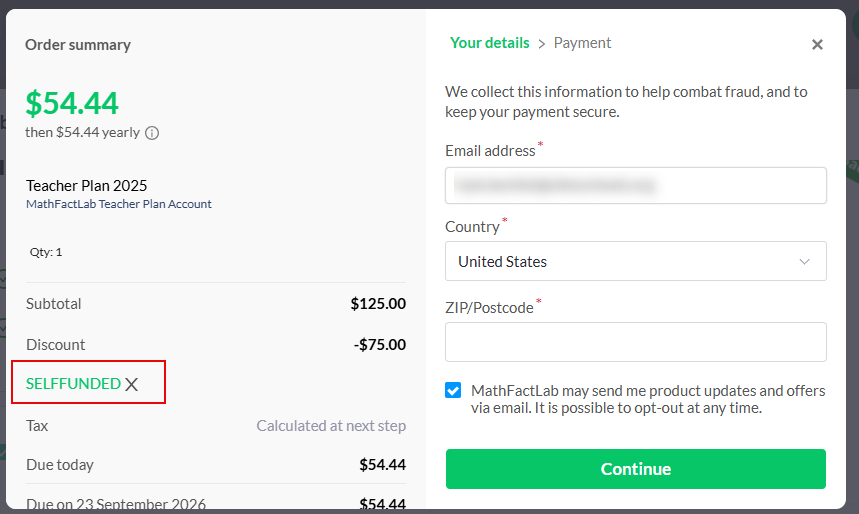
- Enter your credit card details and hit Subscribe Now.
- You will then have access for another year. If you wish to ensure that your account is not automatically renewed at the end of the subscription, please follow these steps.