
Notifications for Teachers
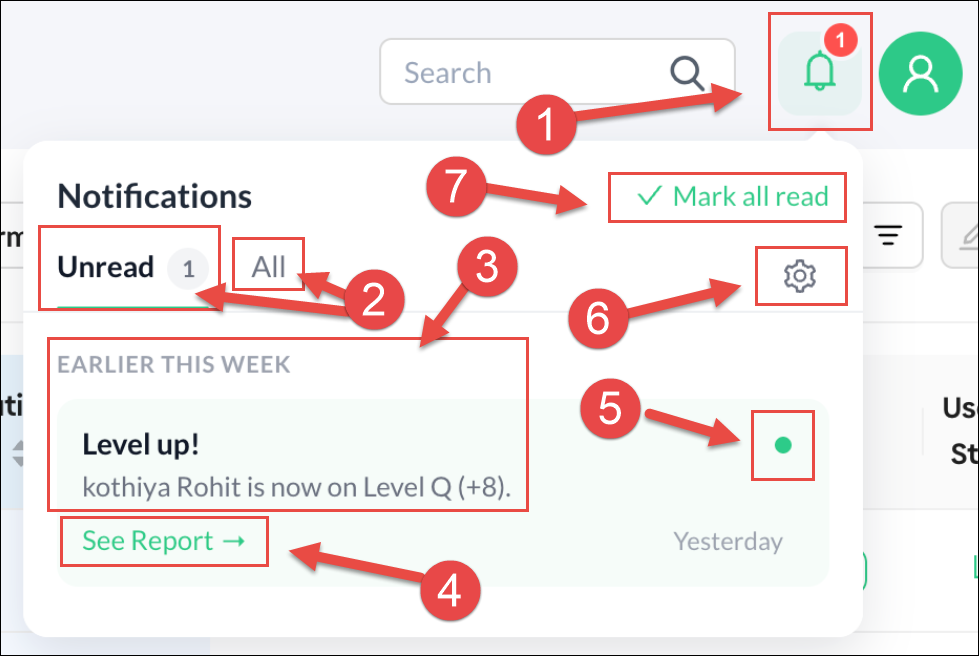
Teachers now have notifications when students attempt Level Lifter Assessments and see if those students were successful or not. Below is a screenshot of a notification informing a teacher that a specific student passed a Level Lifter and is now on the next level. Below is an explanation of the Notification window:
- This is the Notification Alert icon with the number of notifications in red
- Teachers have the option to just see All notifications or just those that are Unread.
- Both successful and unsuccessful Level Lifter attempts will be listed.
- A link is available for viewing the complete Level Lifter report.
- This green dot allows you to remove a notification you have viewed.
- This icon opens the Settings options.
- This link will mark all unread notifications as read.
Below are the Notification Settings options. You can choose to only get notifications if a student has successfully passed a Level Lifter assessment, failed to pass a Level Lifter assessment, or both. You can also turn off notifications completely.

Going forward, other notifications will became available, such as letting teachers know if a student has not progressed to a new level after having completed a significant number of sessions.